Cooking Timer
Master your kitchen workflow with our Online Cooking Timer. Get the most reliable results with the #1 Best cooking timer on Calcflow.net. Our professional-grade engine provides a kitchen timer online with batch tracking, timer with recipe notes, and session statistics to help you cook with 100% precision.
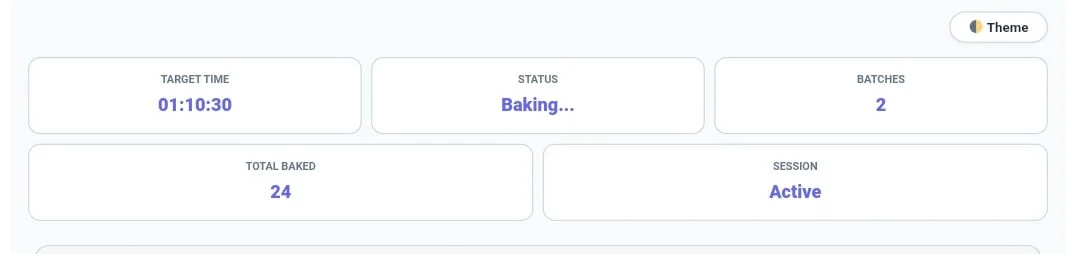
Target Time
00:00:00
Status
Ready
Batches
0
Total Baked
0
Session
Inactive
| # | Finished At | Baking Batch Details | Duration |
|---|
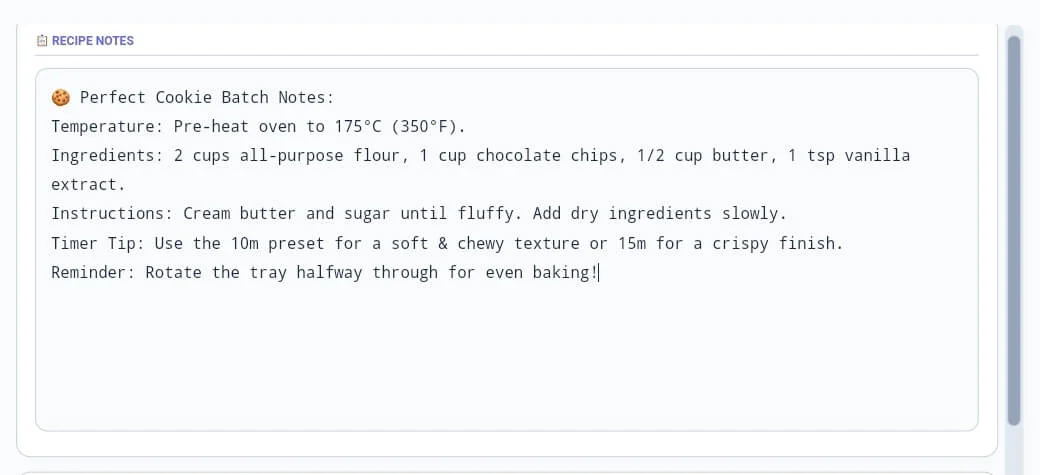
📋 Recipe Notes
🍪 Cookies per Batch
Table of Contents
ToggleWhy our Online Cooking Timer is Essential for Chefs
In the world of culinary precision, timing is the most critical factor for perfect results. A standard clock often fails to track multiple production cycles or save specific temperature notes for different recipes. Our cooking timer is a full-scale kitchen utility engine designed to give you total control over your preparation sessions. Unlike basic mobile apps, this cooking timer provides a professional experience with integrated logging, batch statistics, and a clean interface for chefs worldwide.
At Calcflow.net, we believe that utility should be coupled with detailed record-keeping. That is why our cooking timer doesn’t just count down; it provides a comprehensive audit of your entire production. Every finished tray is reflected in our real-time statistics grid, helping you track target times, total units produced, and active session status. With its modern UI and specialized sidebar modules, this tool is the perfect professional bridge between a simple stopwatch and a professional kitchen management suite.
Tip: To monitor your body metrics while enjoying your freshly prepared meals, use our [BMI Calculator] for accurate results.
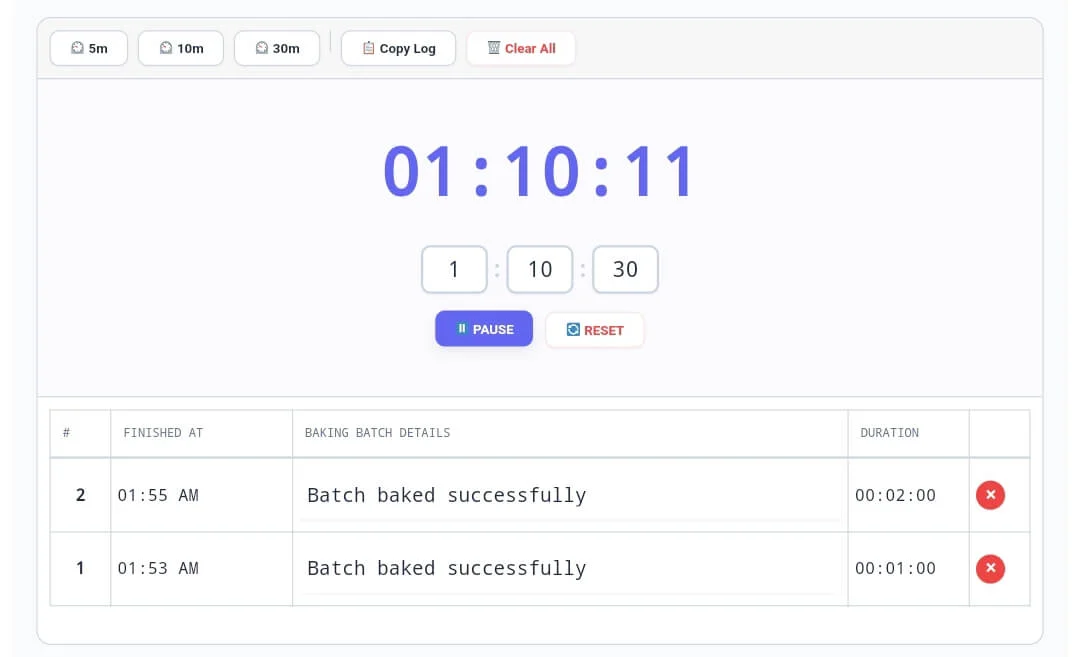
How to use the Kitchen Timer Online (Step-by-Step)
Our tool is designed for maximum efficiency without any complex setup. To master the cooking timer and optimize your recipes, follow these detailed steps:
Step 1: Setting the Precision Countdown
Start by entering your desired hours, minutes, and seconds into the input boxes. Our cooking timer also features quick preset buttons (5m, 10m, 30m) for common tasks like boiling or baking. As soon as you click “▶ START BAKING”, the high-precision countdown begins. Monitoring these initial settings is crucial for identifying the rhythm of your session. Our cooking timer includes an audible tick sound every second to help you maintain focus in a busy kitchen.
Tip: If you need to remove duplicate entries from your ingredients list, try our professional [Duplicate Remover] tool.
Tip: To check the exact character count for your recipe blog descriptions, use our [Character Counter] utility.
Step 2: Utilizing the Automated Batch Log
Every time your countdown finishes, the cooking timer triggers an alarm and automatically logs the session. The History Table records the exact time the batch was completed and the total duration. You can customize the “Batch Details” text for each entry to note specific variations or oven positions. This level of technical logging ensures that your cooking timer results become a professional record of your culinary production for future reference.
Tip: For detailed word-level analysis of your recipe instructions, try our specialized [Word Counter] tool.
Tip: If you need to generate secure security keys for your private recipe folders, use our [Password Generator].
Step 3: Managing Recipe Notes and Units
The sidebar is where you save the technical details of your recipe. Use the Recipe Notes module to type ingredients, temperatures, or special instructions. Our cooking timer allows you to define how many Units per Batch you are making, which automatically updates the “Total Baked” stat. Simply type your notes and the tool will maintain them locally. This technical depth makes our cooking timer a secret weapon for both hobbyists and commercial kitchens.

Tip: If you need to organize your order lists or delivery logs line by line, try our specialized [Line Counter] tool.
Tip: To structure your cooking documentation perfectly, use our [Paragraph Counter] for balance.
Professional Comparison: Standard Timer vs. Calcflow
Most online clocks or oven timers only offer a single countdown with no data persistence. Our cooking timer provides a full suite of professional modules for high-grade data handling.
Integrated Statistics: Live tracking of batches and total units produced.
Batch History Table: Real-time logging of every completed session.
Recipe Note Sync: Keep your ingredients and timer on the same screen.
Preset Shortcuts: One-click time setting for common kitchen tasks.
Privacy Centric: 100% browser-based; your recipes are never uploaded.
Format Flexibility: Export and copy your entire session log instantly.
| Feature | Standard Kitchen Timer | Calcflow Cooking Pro |
| Batch History Table | ❌ No | ✅ Yes |
| Integrated Notes Box | ❌ No | ✅ Yes |
| Total Units Counter | ❌ No | ✅ Yes |
| One-Click Presets | ❌ No | ✅ Yes |
| Copyable History Log | ❌ No | ✅ Yes |
| Dark Mode Support | ❌ No | ✅ Yes |
| Real-time Stats Grid | ❌ No | ✅ Yes |
Tip: To change the case of your recipe titles instantly, use our [Text Case Converter].
Benefits for Chefs, Bakers, and Food Bloggers
The cooking timer on Calcflow is more than a simple clock; it is a productivity asset for the culinary era:
Professional Chefs: Maintain consistency across multiple batches with precise logging.
Bakers: Track exact cooling and baking times to the second for 100% accuracy.
Food Bloggers: Use the logs to calculate prep times for your social media content.
SEO Experts: Create unique visual design layouts with your recipe data.
Tip: For unique artistic layout designs or flipped text in your designs, try our professional [Text Reverser] engine.
Tip: To rotate your food photography images for social media, use our specialized [Image Rotate] tool.
The Technical Logic of our Multiple Batch Timer
Precision timing is a logical system based on the accurate subtraction of millisecond intervals from a target timestamp. Our cooking timer engine uses the modern browser performance API to ensure that the logical order of the countdown is preserved regardless of other background tasks. This level of technical control is why professionals choose Calcflow for their timing needs. To learn more about the science of heat and duration in culinary arts, you can refer to the official Exploratorium guide on the science of cooking.
Tip: For technical data handling, you can convert your recipe codes into binary with our [Text to Binary] tool or decode them using [Binary to Text] instantly.
Frequently Asked Questions (FAQs)
1. Can I track multiple batches with the Cooking Timer?
Yes! Every time the cooking timer countdown hits zero, it automatically logs that batch in the history table and updates your total count based on your custom settings.
2. What happens to my recipe notes if I refresh the page?
Our cooking timer uses local storage to save your recipe notes and history. As long as you are on the same browser, your data will be restored even if you close the tab.
3. How do I use the "Copy Log" feature?
Simply click the “📋 Copy Log” button in the toolbar. The cooking timer will copy your entire session history to your clipboard so you can paste it into any document.
4. Is my private recipe data secure on Calcflow?
Absolutely. All processing in our cooking timer happens locally in your browser. We never store or upload your ingredients, notes, or logs to our servers, ensuring 100% privacy.
5. What is the benefit of the D-pad controls?
While this tool focuses on timing, our navigation philosophy ensures that the cooking timer UI remains clean and easy to browse across all desktop and mobile devices.
6. Does this tool support Dark Mode?
Yes, click the “Theme” button in the top right corner. This reduces eye strain while you manage your kitchen workflow in low-light environments with our professional cooking timer.
Tip: For branding your social media food pages, try our professional [Social Media Maker] tool.
Conclusion: The Professional Choice for Kitchen Accuracy
The cooking timer on Calcflow.net stands as the most comprehensive kitchen manipulation tool available online. By combining real-time metrics with advanced logging and recipe notes, we have built a platform that caters to both curious beginners and technical minds. Stop struggling with basic clocks and let our professional tool handle the heavy lifting of your kitchen management. Calcflow’s cooking timer is the ultimate timer with recipe notes for home cooks and professionals. Bookmark this online cooking timer to ensure every meal is timed to perfection.