Cumulative GPA Calculator - Calculate Your Overall GPA Across Multiple Semesters
Cumulative GPA Calculator is a powerful, free online tool that calculates your overall GPA across multiple semesters instantly. College students, high school students, and academic advisors use this tool to track academic progress, calculate semester-wise GPA, and determine cumulative GPA on 4.0, 5.0, and 10.0 scales. Unlike basic GPA calculators that only handle single semesters, this comprehensive tool supports multiple semesters, unlimited courses, and real-time cumulative calculations. Whether you need to calculate your final GPA before graduation, track progress across semesters, or plan your academic goals, Cumulative GPA Calculator delivers instant, accurate results with a clean interface that works entirely in your browser.
📚 Semesters
Table of Contents
Toggle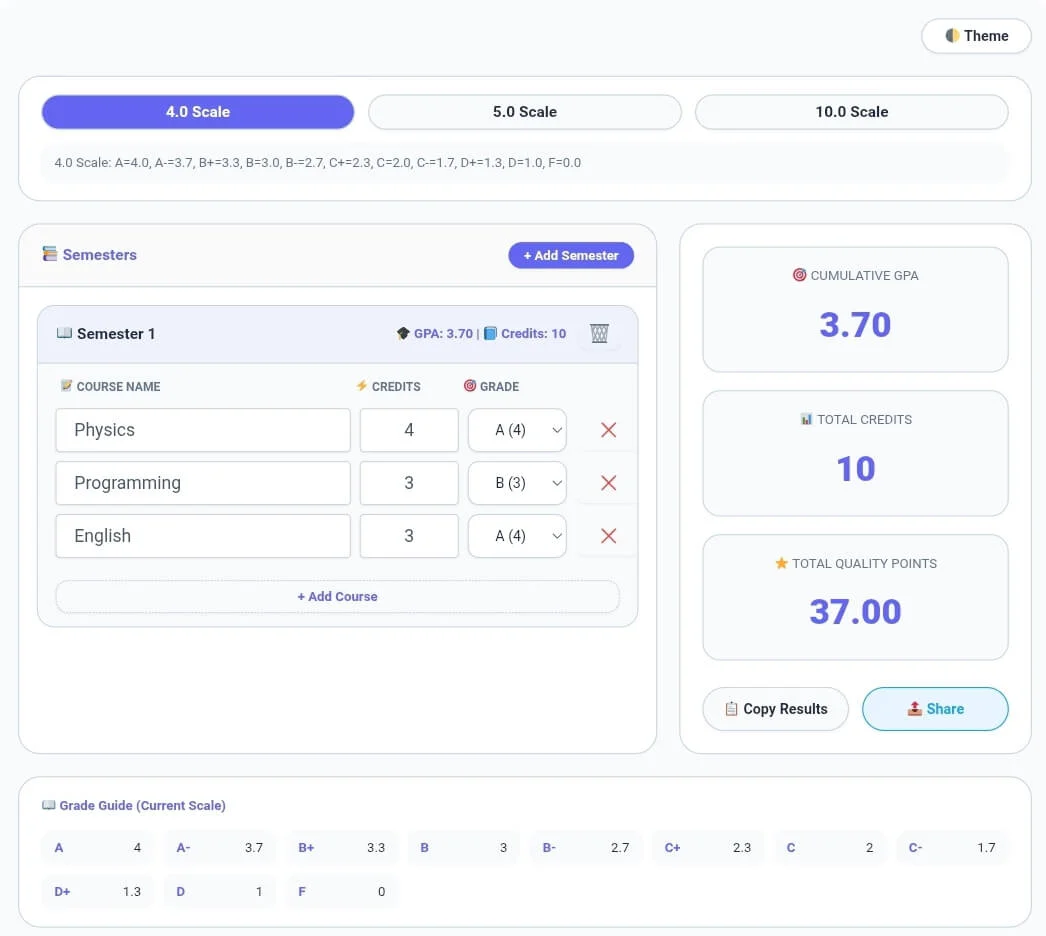
What is Cumulative GPA Calculator?
Cumulative GPA Calculator is an advanced academic tool that calculates overall Grade Point Average across multiple semesters. It serves as a complete academic companion for students tracking their performance over time, advisors helping students plan their academic journey, and anyone who needs to calculate cumulative GPA accurately. The tool features real-time calculations as you add courses, support for three major grading scales (4.0, 5.0, and 10.0), unlimited semester management, and comprehensive grade guides. This cumulative GPA calculator helps students track academic progress across multiple semesters with accurate calculations. In simple terms, your grade point average represents your academic performance across all courses, and this cumulative GPA calculator gives you an accurate picture of your overall grade point average.
When you use Cumulative GPA Calculator, you get actionable insights about your academic performance. The tool calculates semester-wise GPA for each semester individually, then combines all semesters to compute cumulative GPA based on total quality points earned across all courses. The grade guide shows exactly how each letter grade converts to points on your selected scale, ensuring accurate calculations every time.
Built for maximum accuracy, Cumulative GPA Calculator includes innovative features like add/remove semesters, add/remove courses, copy results with detailed breakdown, share functionality, and dark mode for comfortable extended use. All processing happens locally in your browser, meaning your academic data never leaves your device and your privacy is completely protected.
How to Use Cumulative GPA Calculator
Select Your Grading Scale
Using this cumulative GPA calculator is simple – select your scale, add semesters, and view your cumulative GPA instantly. Start by selecting your preferred grading scale. Click 4.0 Scale for standard US college grading, 5.0 Scale for weighted GPA systems, or 10.0 Scale for international grading systems. The grade guide updates instantly showing how each letter grade converts to points on your selected scale.
Five key metrics appear automatically: line count shows the total number of lines in your document with proper numbering on the left side; word count displays every word in your text; character count includes all characters including spaces and punctuation; unique words reveals how many distinct words you’ve used; and reading time estimates how long it takes to read your content based on average reading speed of 200 words per minute.
Add Your Semesters
Click the Add Semester button to create a new semester. Each semester appears as a separate card where you can enter your courses. You can add unlimited semesters to track your entire academic journey from freshman year through graduation.
Enter Your Courses
For each semester, add courses by clicking Add Course. Enter the course name, credit hours, and select the grade received. Credits typically range from 1 to 6 credit hours per course. Grades are available as dropdown options based on your selected scale, showing both the letter grade and point value.
View Real-Time GPA Calculations
As you enter courses, the tool calculates instantly. Each semester shows its GPA and total credits. The right panel displays your cumulative GPA calculator across all semesters, total credits completed, and total quality points earned. All calculations update in real-time with every change.
Manage Your Academic Record
You can expand or collapse semesters to focus on specific terms, delete courses or entire semesters as needed, and edit any course details at any time. The tool automatically recalculates all GPAs whenever you make changes.
Copy or Share Your Results
Click Copy Results to export a complete GPA report including cumulative GPA, semester-wise breakdown, and all course details. Click Share to send your GPA report directly through messaging apps, email, or social media using your device’s native share functionality.
Dark Mode for Comfort
Click the Theme button (🌓) to toggle between light and dark mode. Dark mode reduces eye strain during extended study sessions, especially helpful when planning your academic schedule late at night.
Key Features
This cumulative GPA calculator is designed for complete academic tracking. Whether you’re monitoring progress semester by semester or calculating your final cumulative average, the tool provides accurate academic tracking across all grading scales.
Multiple Grading Scales
4.0 Scale: Standard US grading with A=4.0, A-=3.7, B+=3.3, B=3.0, B-=2.7, C+=2.3, C=2.0, C-=1.7, D+=1.3, D=1.0, F=0.0
5.0 Scale: Weighted GPA system with A+=5.0, A=4.0, B+=3.5, B=3.0, C+=2.5, C=2.0, D+=1.5, D=1.0, F=0.0
10.0 Scale: International grading with A+=10.0, A=9.0, A-=8.0, B+=7.0, B=6.0, B-=5.0, C+=4.0, C=3.0, C-=2.0, D=1.0, F=0.0 –
Cumulative GPA Calculator: Accurately calculates overall GPA across all semesters
Comprehensive Academic Tracking
Unlimited Semesters: Track all semesters from freshman to senior year
Unlimited Courses: Add as many courses per semester as needed
Real-Time GPA: Instant semester GPA and cumulative GPA calculation
Total Credits: Automatic sum of all credits across all semesters
Total Quality Points: Cumulative quality points calculation
Semester Management
Add Semester: Create new semesters with one click
Delete Semester: Remove semesters as needed
Expand/Collapse: Focus on specific semesters by collapsing others
Automatic Naming: Semesters auto-number for easy organization
Course Management
Add Course: Add unlimited courses per semester
Remove Course: Delete individual courses
Edit Course: Update course name, credits, or grade anytime
Course Credits: Support for 1-6 credit hour courses
Grade Selection: Dropdown menus with point values displayed
Comprehensive Grade Guide
Visual Reference: Complete grade-to-point conversion table
Scale-Specific: Guide updates automatically when scale changes
Quick Reference: See point values at a glance
Export & Share Features
Copy Results: Complete GPA report with semester-wise breakdown
Share Functionality: Native sharing to messaging apps and social media
Detailed Report: Includes cumulative GPA, total credits, quality points, and course-by-course breakdown
User Experience Features
Dark/Light Theme: Toggle for eye comfort
Local Storage: Automatic save – never lose your academic record
Mobile Responsive: Works perfectly on phones, tablets, and desktops
No Account Required: Use immediately without registration
Cumulative GPA Calculator vs Other GPA Tools
When evaluating GPA calculation tools, Cumulative GPA Calculator stands out for its multi-semester support, multiple grading scales, and zero cost. Here’s how it compares to basic GPA calculators and premium academic tools:
| Feature | Cumulative GPA Calculator (CalcFlow) | Basic GPA Calculators | Premium Academic Tools |
|---|---|---|---|
| Scales Supported | |||
| 4.0 Scale | ✅ Complete | ✅ Basic | ✅ Yes |
| 5.0 Scale | ✅ Complete | ❌ No | ⚠️ Sometimes |
| 10.0 Scale | ✅ Complete | ❌ No | ⚠️ Sometimes |
| Semester Management | |||
| Multiple semesters | ✅ Unlimited | ❌ Single only | ✅ Yes |
| Semester GPA tracking | ✅ Individual | ❌ No | ✅ Yes |
| Cumulative GPA | ✅ Automatic | ❌ No | ✅ Yes |
| Expand/collapse semesters | ✅ Yes | ❌ No | ⚠️ Sometimes |
| Course Management | |||
| Unlimited courses | ✅ Yes | ⚠️ Limited | ✅ Yes |
| Edit course details | ✅ Yes | ❌ No | ✅ Yes |
| Credit hours support | ✅ 1-6 credits | ⚠️ Fixed | ✅ Yes |
| Grade dropdown with points | ✅ Yes | ❌ No | ⚠️ Sometimes |
| Calculations | |||
| Real-time GPA | ✅ Instant | ✅ Yes | ✅ Yes |
| Total quality points | ✅ Yes | ❌ No | ✅ Yes |
| Total credits sum | ✅ Yes | ❌ No | ✅ Yes |
| Export & Sharing | |||
| Copy detailed report | ✅ Yes | ❌ No | ⚠️ Limited |
| Share results | ✅ Native share | ❌ No | ⚠️ Sometimes |
| Additional Features | |||
| Grade guide | ✅ Complete | ❌ No | ✅ Yes |
| Dark mode | ✅ Free | ❌ No | ⚠️ Usually paid |
| Local storage | ✅ Automatic | ❌ No | ⚠️ Sometimes |
| Privacy & Security | |||
| Server processing | ❌ None – 100% local | ⚠️ Often sends data | ⚠️ Varies |
| Account required | ❌ No | ❌ Usually no | ✅ Often yes |
| Pricing | |||
| Cost | ✅ $0 forever | ✅ Free | 💰 $5-15/month |
Common Use Cases
For College Students
College students use Cumulative GPA Calculator to track academic progress across all semesters. Calculate overall GPA before graduation to ensure you meet requirements, identify which semesters need improvement, and plan future course loads to achieve target GPAs. The semester-wise breakdown helps you see trends in your academic performance over time. College students use this cumulative GPA calculator to track their college GPA across all semesters. The tool helps you calculate your grade point average accurately for scholarship applications and graduation requirements.
For High School Students
High school students track GPA for college applications, calculate weighted vs unweighted GPA on 5.0 scales, and monitor academic standing throughout all four years. The tool helps you understand how each semester affects overall GPA and identify which courses are impacting your GPA most significantly.
For Academic Advisors
Advisors use the tool to help students plan their academic journey, calculate what GPA is needed in remaining semesters to reach graduation goals, and identify students who may need academic support. The detailed reports provide clear documentation for advising sessions.
For Scholarship & Program Applications
Students applying for scholarships or competitive programs use the calculator to accurately report cumulative GPA, verify that GPA meets minimum requirements, and prepare documentation for applications. The copy results feature provides formatted reports ready for submission.
For Parents & Guardians
Parents use the tool to track their child’s academic progress, understand how GPA is calculated across different grading scales, and have informed conversations about academic goals with their children.
Frequently Asked Questions
Q1: What is cumulative GPA and how is it different from semester GPA?
cumulative GPA calculator is your overall Grade Point Average across all semesters you have completed. It combines every course grade and credit hour from every semester into a single average. Semester GPA only reflects courses taken in a specific term. Cumulative GPA gives a complete picture of your academic performance over your entire academic career.
Q2: Which grading scale should I use?
Select the scale that matches your institution’s grading system. US colleges and most high schools use the 4.0 scale where A=4.0. Weighted GPA systems like AP or honors courses often use a 5.0 scale. International students and many universities abroad use the 10.0 scale. Check your transcript or school handbook to confirm which scale applies to you.
Q3: How is GPA calculated?
GPA is calculated by multiplying each course’s grade points by its credit hours, adding all quality points together, and dividing by total credit hours. For example, a 3-credit course with an A (4.0) gives 12 quality points. If you have 30 total quality points across 10 credits, your GPA is 3.0. The tool handles all calculations automatically.
Q4: Can I calculate GPA for future semesters?
Yes, you can use the tool to plan future semesters by adding placeholder courses with estimated grades. This helps you determine what GPA you need in remaining semesters to reach your target cumulative GPA calculator. Simply add a semester for future terms and enter your planned courses and expected grades.
Q5: Does the tool save my data?
Yes, Cumulative GPA Calculator automatically saves all your semesters and courses in your browser’s local storage. If you close the tab or refresh the page, your data reappears when you return. You can also clear data by removing semesters or courses manually. No data is ever transmitted to external servers.
Q6: Is Cumulative GPA Calculator free?
Yes, Cumulative GPA Calculator is completely free with absolutely no hidden charges, premium tiers, or registration requirements. All features including multiple grading scales, unlimited semesters, unlimited courses, copy results, and share functionality are available to everyone at no cost. There are no usage limits or features locked behind paywalls. This cumulative GPA calculator is trusted by students to track academic progress accurately.
Word Counter – Count words in essays and assignments
Character Counter – Track character limits in applications
Line Counter – Count lines in academic work
Paragraph Counter – Structure academic writing properly
Text Case Converter – Format academic papers correctly
Text Reverser – Creative writing and word games
Age Calculator – Check age eligibility for academic programs
Percentage Calculator – Solve all percentage problems instantly
BMI Calculator – Track health and fitness for students
EMI Calculator – Calculate education loan payments
For reliable information about GPA standards and academic assessment, see ACT. This trusted organization provides comprehensive resources on grading scales, academic readiness, and college admission requirements used by institutions across the United States. ACT is recognized globally as a leading authority in educational measurement.