EMI Calculator - Calculate Your Monthly Loan EMI Instantly - Free Tool
EMI Calculator is a powerful, free online tool that calculates your monthly loan EMI, total interest payable, and complete amortization schedule instantly. Home loan borrowers, car loan seekers, personal loan applicants, and financial planners use this tool to understand their repayment obligations before taking a loan. Unlike basic calculators that only show EMI, this comprehensive tool provides loan summary with principal vs interest breakdown, pie and bar charts, amortization schedule with monthly or yearly views, and the ability to compare multiple loans side by side. Whether you’re planning a home loan, car loan, education loan, or personal loan, EMI Calculator delivers instant, accurate results with support for 30+ currencies and a clean interface that works entirely in your browser.
Compare Multiple Loans
Loan 1
Loan 2
Loan 3
Breakdown: Principal vs Interest
Amortization Schedule
| Period | Principal Paid | Interest Paid | Total | Remaining Balance |
|---|
Table of Contents
ToggleWhat is EMI Calculator?
EMI Calculator is a comprehensive financial tool that calculates Equated Monthly Installments for loans. It serves as an essential companion for home buyers planning mortgages, students calculating education loan repayments, entrepreneurs evaluating business loans, and anyone considering borrowing money. The tool features real-time EMI calculation, support for 30+ international currencies, multiple chart views, loan comparison capability, and detailed amortization schedules.
When you use EMI Calculator, you get complete insight into your loan repayment. The tool calculates your monthly EMI based on loan amount, interest rate, and tenure. Beyond basic EMI, it shows total interest payable, total payment over the loan term, and a visual breakdown of principal vs interest. The amortization schedule provides month-by-month or year-by-year details of how each payment is applied to principal and interest.
Built for maximum utility, EMI Calculator includes innovative features like currency selection with 30+ options, pie chart and bar chart visualization, compare loans mode to evaluate up to three loans side by side, monthly and yearly schedule views, and multiple export options including copy EMI, copy table, CSV, TXT, and share. All processing happens locally in your browser, meaning your financial data never leaves your device and your privacy is completely protected.
How to Use EMI Calculator
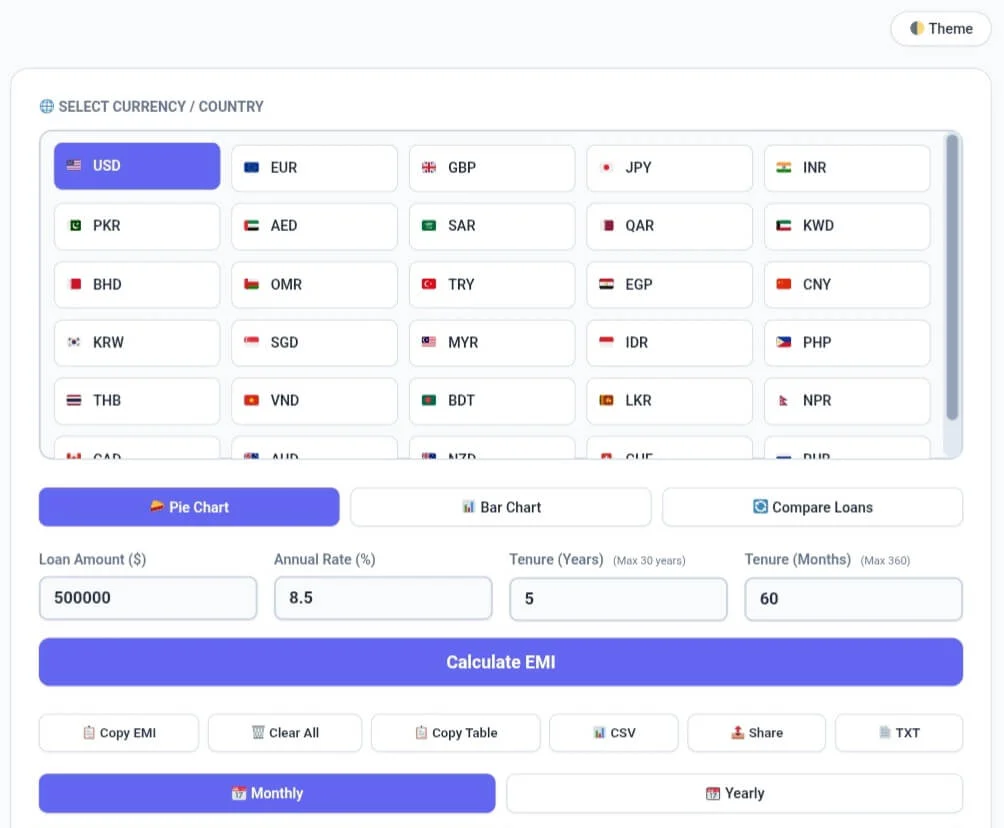
Select Your Currency
Start by selecting your preferred currency from the currency grid. Choose from 30+ currencies including USD ($), EUR (€), GBP (£), INR (₹), PKR (₨), AED (د.إ), SAR (﷼), and many more. The selected currency symbol appears throughout the calculator.
Enter Loan Details
Enter your loan amount in the selected currency, annual interest rate percentage, and loan tenure. You can enter tenure in years (maximum 30 years) or months (maximum 360 months). The calculator automatically syncs both fields.
Calculate Your EMI
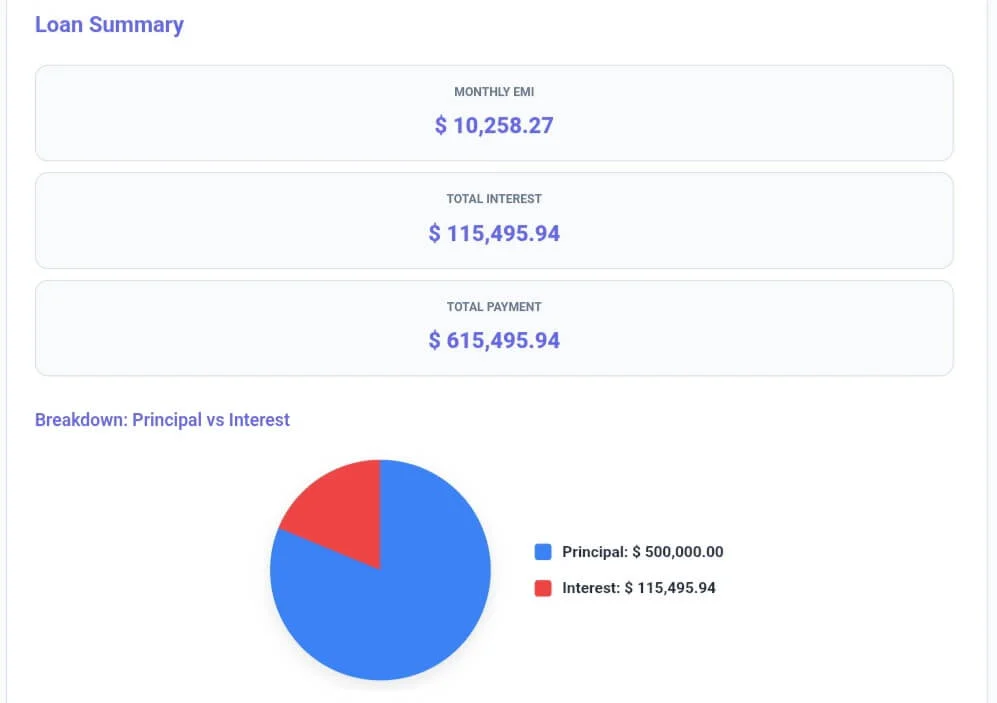
Click Calculate EMI to get instant results. The tool displays your monthly EMI, total interest payable, total payment, and a visual pie chart showing principal vs interest breakdown.
View Loan Summary & Results
The results section shows three key metrics: Monthly EMI – your fixed monthly payment, Total Interest – total interest you’ll pay over the loan term, and Total Payment – principal plus interest. The pie chart visually represents how much of your total payment goes toward principal versus interest.
Explore Amortization Schedule
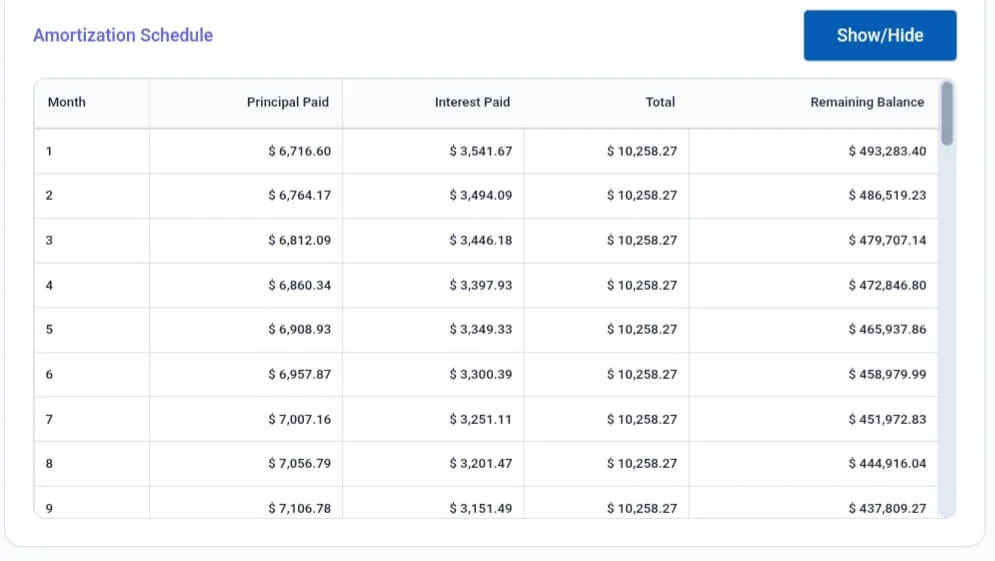
Scroll down to view the complete amortization schedule. Click Monthly to see month-by-month breakdown or Yearly to see annual summaries. The table shows principal paid, interest paid, total payment, and remaining balance for each period. Click Show/Hide to toggle the table view.
Compare Multiple Loans
Click the Compare Loans button to switch to comparison mode. Enter details for up to three different loans and click Compare Loans to see side-by-side EMI, total interest, and total payment for each option. Perfect for comparing different loan offers from banks or different scenarios.
Choose Chart View
Toggle between Pie Chart for visual breakdown of principal vs interest, Bar Chart for height comparison, and Compare Loans for multiple loan analysis. Each view provides unique insights into your loan structure.
Export & Share Results
Use the action buttons to copy EMI to clipboard, copy the entire amortization table, export as CSV for spreadsheet analysis, share results via messaging apps, or download as TXT file. All exports include loan summary and complete schedule.
Key Features
Core EMI Calculation
Monthly EMI: Calculate fixed monthly payment amount
Total Interest: Total interest payable over loan term
Total Payment: Principal + Total Interest
Principal vs Interest: Visual breakdown with pie and bar charts
Amortization Schedule: Month-by-month or year-by-year repayment details
Currency & International Support
30+ Currencies: USD, EUR, GBP, INR, PKR, AED, SAR, JPY, CNY, and more
Currency Symbols: Automatic symbol display throughout calculator
Localization: Support for international users worldwide
Multiple View Options
Pie Chart: Visual breakdown of principal vs interest
Bar Chart: Height comparison of principal and interest amounts
Compare Loans: Side-by-side comparison of up to 3 loans
Monthly View: Detailed month-by-month amortization
Yearly View: Annual summary of payments
Flexible Tenure Input
Years Input: Enter tenure in years (1-30 years)
Months Input: Enter tenure in months (1-360 months)
Auto-Sync: Both fields update automatically
Validation: Automatic limits to prevent invalid entries
Export & Sharing Options
Copy EMI: One-click copy of monthly EMI
Copy Table: Copy entire amortization table to clipboard
CSV Export: Download as CSV for spreadsheet analysis
Share: Native sharing via messaging apps
TXT Download: Download complete schedule as text file
User Experience Features
Clear All: Reset all fields with confirmation
Responsive Design: Works perfectly on mobile, tablet, and desktop
Dark/Light Theme: Toggle for eye comfort
Toast Notifications: Confirmation messages for actions
Scrollable Grids: Currency selection with 16px scrollbar
EMI Calculator vs Other Tools
When evaluating EMI calculators, EMI Calculator stands out for its comprehensive features, currency support, and zero cost. Here’s how it compares to basic calculators and premium financial tools:
| Feature | EMI Calculator (CalcFlow) | Basic EMI Calculators | Premium Financial Tools |
|---|---|---|---|
| Core Features | |||
| Monthly EMI | ✅ Instant | ✅ Basic | ✅ Yes |
| Total Interest | ✅ Yes | ✅ Yes | ✅ Yes |
| Total Payment | ✅ Yes | ✅ Yes | ✅ Yes |
| Principal vs Interest Chart | ✅ Pie & Bar | ❌ No | ⚠️ Sometimes |
| Amortization Schedule | ✅ Monthly & Yearly | ❌ Usually no | ✅ Yes |
| Currency Support | |||
| Currency selection | ✅ 30+ currencies | ❌ No | ⚠️ Limited |
| Currency symbols | ✅ Automatic | ❌ No | ⚠️ Sometimes |
| Loan Comparison | |||
| Compare multiple loans | ✅ Up to 3 loans | ❌ No | ⚠️ Premium |
| Side-by-side results | ✅ Yes | ❌ No | ⚠️ Premium |
| Flexible Input | |||
| Years input | ✅ 1-30 years | ✅ Basic | ✅ Yes |
| Months input | ✅ 1-360 months | ❌ No | ⚠️ Sometimes |
| Auto-sync years/months | ✅ Yes | ❌ No | ✅ Yes |
| Export Options | |||
| Copy EMI | ✅ Yes | ❌ No | ⚠️ Sometimes |
| Copy Table | ✅ Yes | ❌ No | ⚠️ Premium |
| CSV export | ✅ Yes | ❌ No | ✅ Yes |
| TXT download | ✅ Yes | ❌ No | ✅ Yes |
| Share results | ✅ Native share | ❌ No | ⚠️ Premium |
| User Experience | |||
| Dark mode | ✅ Free | ❌ No | ⚠️ Usually paid |
| Responsive design | ✅ Mobile optimized | ⚠️ Limited | ✅ Yes |
| Privacy & Security | |||
| Server processing | ❌ None – 100% local | ⚠️ Often sends data | ⚠️ Varies |
| Account required | ❌ No | ❌ Usually no | ✅ Often yes |
| Pricing | |||
| Cost | ✅ $0 forever | ✅ Free | 💰 $10-30/month |
Common Use Cases
For Home Loan Borrowers
Home buyers use EMI Calculator to estimate monthly mortgage payments, compare different loan amounts and interest rates, and plan their home purchase budget. The amortization schedule helps understand how much principal is paid over time, crucial for long-term financial planning.
For Car Loan Seekers
Car buyers calculate EMI for different vehicle prices, down payment scenarios, and loan tenures. Compare offers from multiple banks, understand total interest cost, and choose the most affordable loan option before visiting dealerships.
For Students & Education Loan Applicants
Students and parents use the tool to calculate education loan EMIs, understand repayment obligations after graduation, and plan for future monthly payments. The currency selector helps international students calculate loans in different currencies.
For Personal Loan Planning
Individuals planning personal loans for weddings, travel, or emergencies use the calculator to determine affordable EMIs based on their monthly income. Compare different interest rates and tenures to find the most manageable repayment schedule.
For Financial Advisors & Planners
Financial professionals use EMI Calculator to help clients understand loan implications, compare financing options, and create repayment strategies. The compare loans feature allows side-by-side evaluation of different loan scenarios for client presentations.
Frequently Asked Questions
Q1: What is EMI and how is it calculated?
EMI (Equated Monthly Installment) is the fixed amount you pay each month to repay a loan. It includes both principal repayment and interest. The formula is EMI = P × r × (1+r)^n / ((1+r)^n – 1), where P is loan amount, r is monthly interest rate, and n is number of months. EMI Calculator handles this calculation automatically.
Q2: What is the maximum loan tenure I can calculate?
EMI Calculator supports loan tenures up to 30 years (360 months). This covers most home loans, car loans, and personal loans. The tool automatically validates inputs and prevents entries beyond these limits.
Q3: What currencies does the EMI Calculator support?
The tool supports over 30 currencies including USD ($), EUR (€), GBP (£), INR (₹), PKR (₨), AED (د.إ), SAR (﷼), JPY (¥), CNY (¥), CAD (C$), AUD (A$), and many more. Simply select your currency from the grid and the symbol appears throughout the calculator.
Q4: What is an amortization schedule and why is it useful?
An amortization schedule shows how each EMI payment is split between principal and interest over the loan term. Early payments go mostly toward interest, while later payments focus more on principal. This schedule helps you understand loan progress and plan for prepayments.
Q5: Can I compare multiple loan options?
Yes, EMI Calculator includes a compare loans mode. Click the Compare Loans button to switch to comparison view, enter up to three different loan scenarios, and see side-by-side EMI, total interest, and total payment for each option. Perfect for comparing offers from different banks.
Q6: Is EMI Calculator really free?
Yes, EMI Calculator is completely free with absolutely no hidden charges, premium tiers, or registration requirements. All features including 30+ currencies, loan comparison, amortization schedules, and all export options are available to everyone at no cost.
- Age Calculator – Calculate exact age in years, months, and days
Percentage Calculator – Solve all percentage problems instantly
BMI Calculator – Calculate body mass index and health status
Cumulative GPA Calculator – Calculate education loan needs
For detailed guidance on loan amortization and financial planning, see Consumer Financial Protection Bureau (CFPB) . This US government agency provides comprehensive resources on mortgages, loans, and understanding amortization schedules for consumers.