Text Case Converter
ransform your content with the professional Text Case Converter on Calcflow.net. Our real-time Online Case Converter offers over 30 options to change case online, from standard Title Case to developer-centric camelCase and snake_case, from standard Title Case to developer-centric camelCase and snake_case, ensuring absolute precision for every project.
Lines
0
Words
0
Chars
0
Unique
0
Density
-
Conversion Options
Find & Replace
Table of Contents
ToggleWhy our Online Case Converter is the Ultimate Choice
In the digital age, formatting consistency is the hallmark of professional writing and coding. Whether you are a blogger needing a catchy title, a developer naming variables, or a social media manager crafting a post, manual editing is time-consuming and prone to errors. Our Text Case Converter is designed to be a complete text transformation engine. Unlike basic tools that only offer uppercase and lowercase, this Text Case Converter provides a “Master” experience with technical cases like PascalCase and Kebab-case, making it indispensable for any digital task.
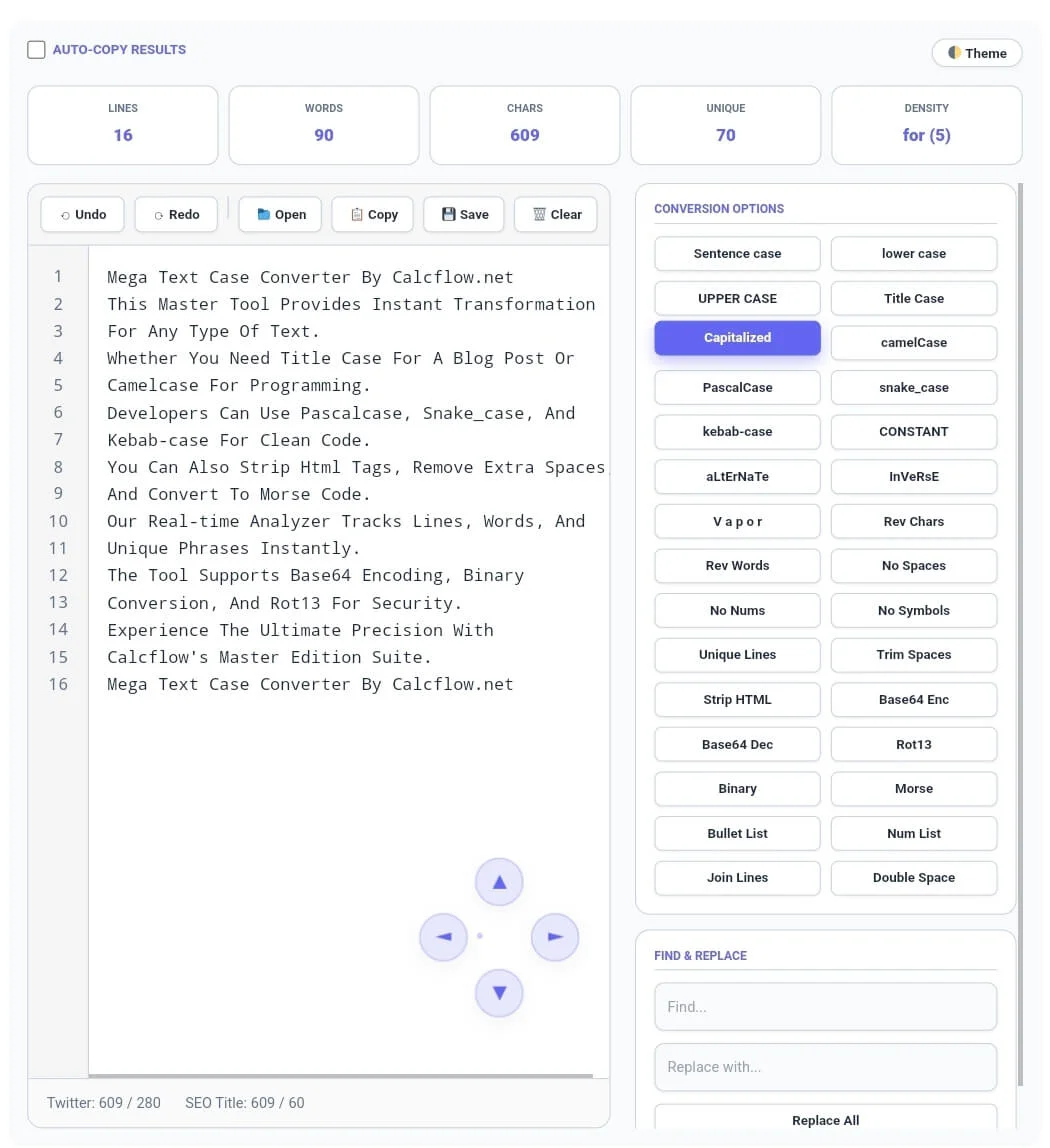
At Calcflow.net, we understand that speed matters. Our Text Case Converter updates your statistics and converts your text instantly with every click. It handles large blocks of text efficiently within your browser, keeping your data secure and private. With its modern interface and extensive sidebar, this tool bridges the gap between a simple converter and a professional text analysis suite.
How to Change Case Online: A Step-by-Step Guide
Using our tool is intuitive, yet it offers deep functionality for power users. We have divided the workflow into four main sections to help you maximize the potential of the Text Case Converter:
Tip: For identifying and removing redundant lines in your code, use our professional [Duplicate Remover].
Step 1: Inputting Your Text and Real-Time Stats
Simply type or paste your content into the main editor. You can also use the “Open” folder icon in the toolbar to upload text-based files directly. As soon as you enter text, the stats grid at the top will display your Lines, Words, Chars, Unique phrases, and Character Density.

The “Density” metric is a standout feature of this Text Case Converter. it identifies the most frequently used words or characters, which is essential for SEO experts who want to avoid repetition. This live feedback ensures your content is balanced before you even start the conversion process.
Tip: For unique artistic layout designs or flipped text, try our professional [Text Reverser] engine.
Step 2: Navigating the Pro Editor with 4-Way Scroll
Our editor is built for high-performance editing. It features Line Numbers to help you track specific lines in long documents. If you make a mistake, the Undo and Redo buttons allow you to revert changes instantly.
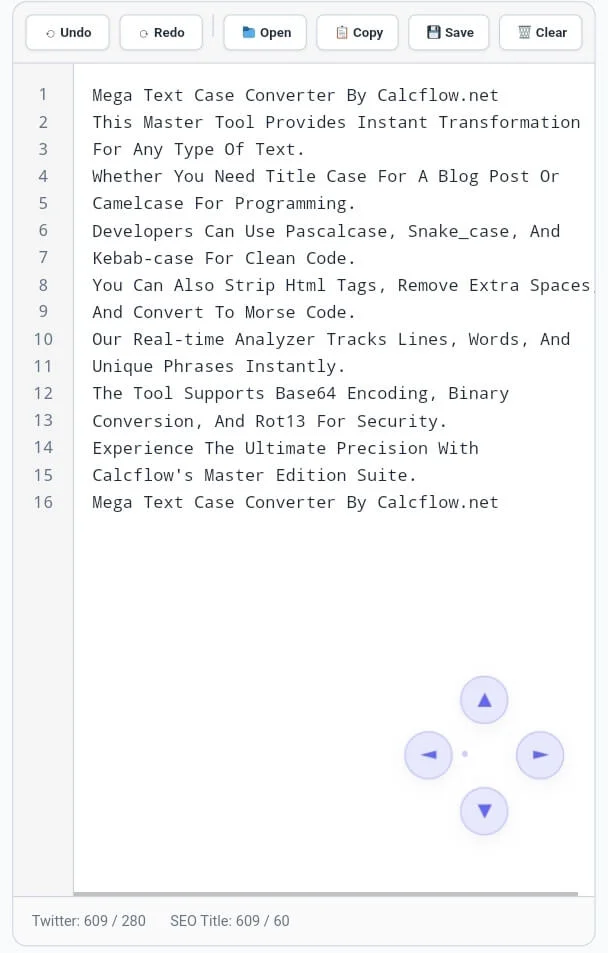
Note for Desktop/Laptop Users: To provide a professional and clutter-free experience, our toolbar and sidebar are designed with click-and-drag scrolling. If any buttons (like the ‘Clear’ button) or conversion tools are not fully visible, simply grab the area with your mouse and drag left, right, or down to reveal all features. For desktop users, we have integrated a unique 4-way glass scroll system (D-pad) at the bottom right. These buttons allow you to scroll through your text horizontally and vertically using just your mouse. Please note: These scroll buttons are an exclusive desktop feature. Mobile and tablet users can continue using standard touch gestures to navigate their text with ease.
Step 3: Choosing Your Conversion Option
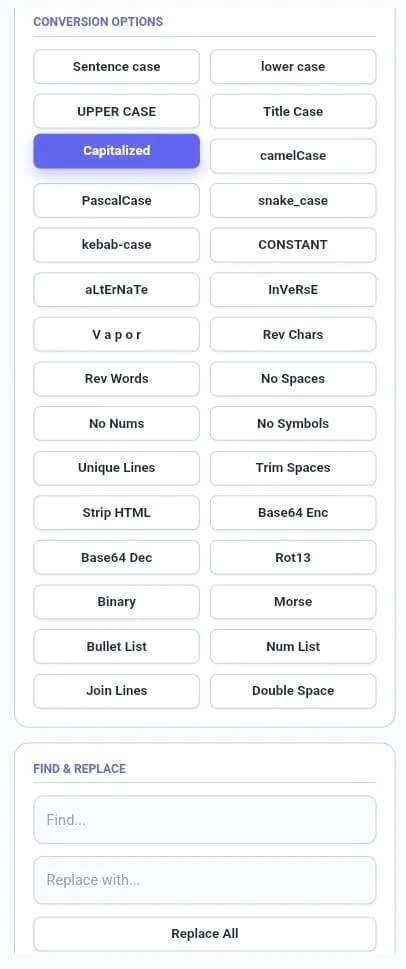
The sidebar is the heart of the Text Case Converter. With over 30 options, you can instantly transform your text. Choose “Title Case” for blog headers, “camelCase” for variable naming, or “Vapor” for a unique aesthetic style.
Tip: For secure communication or distress signals, try our specialized [Text to Morse Code] tool.
One of the most powerful features is the “Auto-Copy Results” checkbox. When enabled, every time you click a conversion button, the result is automatically copied to your clipboard. This Text Case Converter feature saves you thousands of clicks over a single work session.
Professional Comparison: Standard Tool vs. Calcflow Master Edition
Why choose our Text Case Converter over others? The comparison below highlights the advanced capabilities we offer to professional users:
| Feature | Standard Online Tool | Calcflow Master Edition |
| Real-time Case Conversion | ✅ Yes | ✅ Yes |
| Developer Cases (camel, snake) | ❌ No | ✅ Yes |
| Line & Unique Word Stats | ❌ No | ✅ Yes |
| Auto-Copy Result Support | ❌ No | ✅ Yes |
| 4-Way Glass Scroll (D-Pad) | ❌ No | ✅ Yes (Desktop) |
| Binary & Base64 Encoding | ❌ No | ✅ Yes |
| Find & Replace Module | ❌ No | ✅ Yes |
| Dark Mode Interface | ❌ No | ✅ Yes |
Key Benefits for Developers, Writers, and SEO Experts
The Text Case Converter on Calcflow is more than just a formatting tool; it is a technical productivity asset. For developers, switching between PascalCase and snake_case becomes a one-click task. For writers, the ability to remove numbers or strip HTML tags is a massive time-saver when cleaning up drafts.
Tip: If you are focusing on document structure, try our [Paragraph Counter] to organize your blocks of text perfectly.
SEO experts rely on the Text Case Converter to ensure their meta titles and descriptions are properly formatted. By using the Find & Replace module, you can standardize specific keywords across a 5,000-word document in seconds. Every professional knows that a reliable Text Case Converter is the foundation of high-quality digital content.
Tip: To audit your lists further, use our [Line Counter] to sort your entries alphabetically after converting their case.
Advanced Transformation Features Explained
Advanced Camel Case Converter & Technical Encoding for Developers
Our Text Case Converter includes pro utilities like Base64 Encoding/Decoding, Binary conversion, and Rot13. These are essential for developers working with data obfuscation or preparing strings for code implementation. No more switching between multiple websites—everything you need is right here.
Linguistic Conversions: Morse and Reverse
For specialized projects, you can convert text into Morse Code or use the Reverse Words and Reverse Chars functions. These features add a layer of creative flexibility that standard converters simply don’t provide.
To understand the global rules of digital typography and formatting, you can refer to the official W3C standards for text transformation.
Frequently Asked Questions (FAQs)
1. Why can't I see the 4-way scroll buttons on my phone?
The 4-way glass scroll buttons are specifically optimized for desktop users to enhance mouse-based navigation in the editor. Because mobile devices use touch-to-scroll gestures, these buttons are disabled on mobile views to keep the interface clean and fast.
2. How do I use the "Auto-Copy" feature?
Simply check the “Auto-Copy Results” box at the top left of the tool. Now, every time you click a button in the sidebar (like UPPERCASE or Title Case), the Text Case Converter will automatically copy the new text to your clipboard.
3. Can this tool handle programming variables?
Yes! Our Text Case Converter is built with developers in mind. Use camelCase, PascalCase, snake_case, and kebab-case to instantly format your code variables and constants according to your language’s style guide.
4. How do I save my converted text?
Once you are happy with your transformation, click the “Save” (Disk icon) in the toolbar. The Text Case Converter will download your work as a .txt file directly to your device.
5. Is my data safe on Calcflow.net?
Absolutely. This Text Case Converter processes everything locally in your browser using JavaScript. We never upload your text to our servers, ensuring your sensitive data remains 100% private.
Conclusion: Elevate Your Text Workflow with Calcflow
The Text Case Converter on Calcflow.net is the most comprehensive text transformation tool available online. By combining professional editing features with over 30 conversion options, we have created a workspace that saves you time and ensures your content is always perfect. Calcflow’s text case converter is more than just a snake case converter; it’s a complete toolkit for linguistic and technical transformations. Bookmark this online case converter today.
Whether you are a coder organizing a script or a writer polishing a headline, our Text Case Converter provides the precision and variety you need. Stop wasting time on manual retyping and let our master tool handle the technical side for you. Bookmark the Text Case Converter today and take the first step toward a more efficient writing process!
Before publishing, make sure to check your character count using our specialized [Character Counter] tool.