Text to Binary Converter - Convert Text to Binary Code and Back Instantly
Text to Binary Converter is a powerful, free online tool that converts text to binary code and binary back to text instantly. Computer science students, programmers, cybersecurity enthusiasts, and digital learners use this tool to understand how computers store text, encode messages, and work with binary data. Unlike basic converters that only offer one-way conversion, this master tool provides bidirectional conversion between text and binary, text to hex, hex to text, Base64 encoding, and real-time byte statistics. Whether you’re learning how computers work, encoding secret messages, or debugging binary data, Text to Binary Converter delivers instant, reliable results with a clean interface that works entirely in your browser.
Lines
0
Words
0
Chars
0
Bytes
0
Top Bit
-
Binary Actions
Text Formatting
Binary Tools
Find & Replace
Table of Contents
Toggle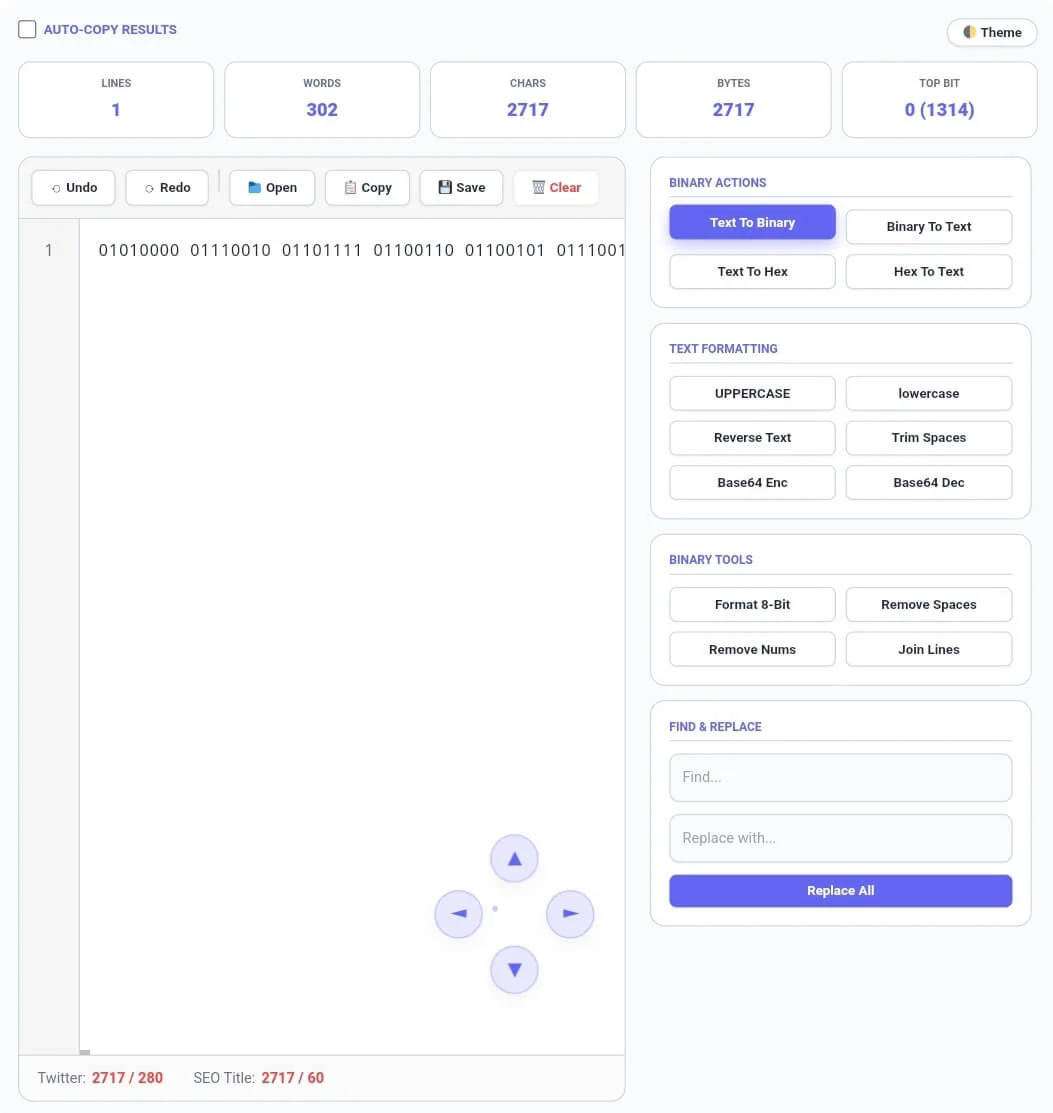
What is Text to Binary Converter?
Text to Binary Converter is an essential computer science tool that translates between human-readable text and binary code, the fundamental language of computers. It serves as a complete learning companion for students studying digital systems, programmers debugging binary data, cybersecurity professionals encoding information, and anyone curious about how computers represent text. The tool features real-time conversion as you type or paste content, bidirectional translation between text and binary, hexadecimal conversion, Base64 encoding, and comprehensive binary analysis.
When you use Text to Binary Converter, you get insights into how computers store data. The tool converts each character to its binary representation using ASCII or Unicode encoding, where each letter, number, or symbol becomes a sequence of 0s and 1s. Real-time statistics show lines, words, characters, bytes, and the most frequent bit (0 or 1) in your data.
Built for maximum utility, Text to Binary Converter includes innovative features like text formatting tools, binary tools like format 8-bit and remove spaces, Base64 encoding, hex conversion, and find and replace. All processing happens locally in your browser, meaning your text never leaves your device and your privacy is completely protected.
How to Use Text to Binary Converter
Basic Usage - Convert Text to Binary
Using Text to Binary Converter is simple. Navigate to the tool and find a clean text editor waiting for your content. Type or paste regular text into the editor area. Click Text To Binary in the Binary Actions section, and the tool instantly converts your text to binary code, showing each character as an 8-bit binary sequence (e.g., “A” becomes “01000001”).
Convert Binary Back to Text
Paste binary code (sequences of 0s and 1s) into the editor area. Click Binary To Text to instantly decode the binary back to readable text. The tool handles binary with or without spaces, converting every 8 bits back to the corresponding character.
Convert Text to Hex and Hex to Text
Click Text To Hex to convert text to hexadecimal code, where each character becomes a two-digit hex value (e.g., “A” becomes “41”). Click Hex To Text to decode hexadecimal back to readable text. This is useful for debugging, encoding, and understanding computer memory representation.
Format Your Text
The sidebar includes text formatting tools. Click UPPERCASE to convert all text to capitals, lowercase for all lowercase, Reverse Text to flip text backwards, Trim Spaces to remove extra whitespace, Base64 Enc to encode text to Base64 format, and Base64 Dec to decode Base64 back to text.
Binary Tools
Use Format 8-Bit to ensure every binary sequence has exactly 8 bits (adds leading zeros if needed). Click Remove Spaces to remove all spaces from binary code, Remove Nums to strip digits, and Join Lines to combine multiple lines into a single paragraph.
Find & Replace
Use Find & Replace for precise text modifications. Enter search terms in the Find field and replacement text in the Replace field, then click Replace All to instantly substitute every occurrence throughout your document.
Auto-Copy & File Operations
Enable the Auto-Copy Results checkbox to automatically copy converted text to clipboard after any operation. Click Open to upload text files in 10+ formats, Copy to copy all text, Save to download as timestamped file, and Clear to reset everything.
Key Features
Binary & Hex Conversion
Text To Binary: Convert text to 8-bit binary code
Binary To Text: Decode binary back to readable text
Text To Hex: Convert text to hexadecimal code
Hex To Text: Decode hexadecimal back to text
Real-Time Statistics
Lines Counter: Total lines in your text or binary data
Words Counter: Number of words or binary groups
Characters Counter: Total characters in text
Bytes Counter: Total bytes of data (file size)
Top Bit: Most frequent bit (0 or 1) with count
Twitter Limit: Real-time 280 character monitoring
SEO Title Limit: 60-character monitor
Text Formatting Tools
UPPERCASE: Convert all text to capital letters
lowercase: Convert all text to lowercase
Reverse Text: Flip entire text backwards
Trim Spaces: Remove extra whitespace from line ends
Base64 Enc: Encode text to Base64 format
Base64 Dec: Decode Base64 back to text
Binary Tools
Format 8-Bit: Ensure binary sequences are 8 bits with leading zeros
Remove Spaces: Remove all spaces from binary code
Remove Nums: Strip all digits from text
Join Lines: Combine multiple lines into single paragraph
Find & Replace
Find Word: Search for specific terms in text or binary
Replace With: Substitute found terms with new text
Replace All: Apply changes throughout entire document
User Experience Features
Undo/Redo History: 50-step action tracking with keyboard shortcuts
Auto-Copy Results: Instant clipboard transfer after conversion
File Upload: Support for 10+ text-based file formats
File Download: Timestamped saves with format preservation
Dark/Light Theme: Toggle for eye comfort
4-Way Scroll Controls: Precision navigation for large documents
Text to Binary Converter vs Other Tools
When evaluating binary conversion tools, Text to Binary Converter stands out for its comprehensive conversion options, hex support, and zero cost. Here’s how it compares to basic converters and premium encoding tools:
| Feature | Text to Binary Converter (CalcFlow) | Basic Binary Converters | Premium Encoding Tools |
|---|---|---|---|
| Conversion | |||
| Text to binary | ✅ 8-bit format | ✅ Basic | ✅ Yes |
| Binary to text | ✅ Complete decoding | ⚠️ Often missing | ✅ Yes |
| Text to hex | ✅ Yes | ❌ No | ✅ Yes |
| Hex to text | ✅ Yes | ❌ No | ✅ Yes |
| Base64 encode/decode | ✅ Both | ❌ No | ⚠️ Premium |
| Binary Tools | |||
| Format 8-bit | ✅ Yes | ❌ No | ⚠️ Sometimes |
| Remove spaces | ✅ Yes | ❌ No | ✅ Yes |
| Statistics | |||
| Bytes counter | ✅ Real-time | ❌ No | ✅ Yes |
| Top bit analysis | ✅ Free | ❌ No | ⚠️ Paid |
| Text Formatting | |||
| Case conversion | ✅ Both | ❌ No | ✅ Yes |
| Reverse text | ✅ Yes | ❌ No | ⚠️ Sometimes |
| Trim spaces | ✅ Yes | ❌ No | ✅ Yes |
| Find & Replace | |||
| Replace all | ✅ Yes | ❌ No | ✅ Yes |
| File Operations | |||
| File upload | ✅ 10+ formats | ❌ No | ✅ Yes |
| File download | ✅ Timestamped | ❌ No | ✅ Yes |
| User Experience | |||
| Undo/Redo history | ✅ 50 steps | ❌ No | ✅ Yes |
| Auto-copy results | ✅ Yes | ❌ No | ❌ Rarely |
| Dark mode | ✅ Free | ❌ No | ⚠️ Usually paid |
| Privacy & Security | |||
| Server processing | ❌ None – 100% local | ⚠️ Often sends data | ⚠️ Varies |
| Account required | ❌ No | ❌ Usually no | ✅ Often yes |
| Pricing | |||
| Cost | ✅ $0 forever | ✅ Free | 💰 $5-15/month |
Common Use Cases
For Computer Science Students
Computer science students use Text to Binary Converter to understand how computers store text, learn ASCII and Unicode encoding, and visualize binary representation. The tool helps with homework assignments, exam preparation, and understanding fundamental computer architecture concepts. Byte statistics show how much storage text actually uses.
For Programmers & Developers
Programmers use the tool to debug binary data, convert between encodings, and understand how different character encodings work. Hex conversion helps with memory debugging, and Base64 encoding is useful for data transmission. The binary tools help format binary strings for code testing.
For Cybersecurity Professionals
Security professionals use Text to Binary Converter for encoding payloads, analyzing binary data, and understanding how malicious code might be obfuscated. Base64 and hex conversions are essential for working with encoded data in penetration testing and security research.
For Digital Learners & Enthusiasts
Anyone curious about how computers work uses the tool to explore binary representation of text. Seeing “Hello” become “01001000 01100101 01101100 01101100 01101111” makes digital concepts tangible. The tool makes learning fun and interactive.
For Cryptography & Puzzle Creators
Puzzle creators use binary and hex encoding to create challenges for escape rooms, treasure hunts, and coding puzzles. The conversion tools help encode clues and decode solutions. Base64 encoding adds another layer of complexity for advanced puzzles.
Frequently Asked Questions
Q1: What is binary code and why do computers use it?
Binary code is a system of representing text and data using only 0s and 1s. Computers use binary because electronic circuits have two states – on (1) and off (0). Each character is represented by a unique 8-bit binary sequence called a byte. For example, the letter “A” is 01000001 in binary.
Q2: Can I convert binary back to text?
Yes, Text to Binary Converter supports bidirectional conversion. Simply paste binary code (0s and 1s) into the editor, then click Binary To Text. The tool instantly decodes the binary back to readable text, handling both spaced and unspaced binary formats.
Q3: What's the difference between binary and hexadecimal?
Binary uses base-2 (0s and 1s), while hexadecimal uses base-16 (0-9 and A-F). Hexadecimal is more compact, with each hex digit representing 4 binary bits. For example, binary 01000001 equals hex 41. Both are used in computing to represent data more concisely.
Q4: How does the bytes counter work?
The bytes counter shows the actual file size of your text in bytes. Each character typically takes 1 byte (8 bits) in standard ASCII encoding. This helps you understand how much storage your text uses and is useful for working with file size constraints.
Q5: Can I upload files to convert?
Yes, Text to Binary Converter supports text-based file uploads including .txt, .js, .html, .css, .py, .md, .json, .sql, .xml, .log, .env, and .csv files. Maximum file size is 2MB for optimal performance. Click Open to upload your file, apply any conversion, and save the transformed result.
Q6: Is Text to Binary Converter free?
Yes, Text to Binary Converter is completely free with absolutely no hidden charges, premium tiers, or registration requirements. All features including text to binary, binary to text, hex conversion, Base64 encoding, and real-time statistics are available to everyone at no cost.
Word Counter – Count words and characters in text before conversion
Character Counter – Track character limits for encoding
Line Counter – Count lines in text and binary data
Paragraph Counter – Analyze Structure text before conversion
Text Case Converter – Format text before binary conversion
Text Reverser – Reverse entire text or individual words
Text to Morse Code – Convert text to Morse code
Duplicate Remover – Clean up repeated text before encoding
Binary to Text – Decode binary back to readable text
Tiny Text Generator – Tiny Text Create fancy text styles
Age Calculator – Calculate exact age
Percentage Calculator – Calculate percentages
BMI Calculator – Track health metrics
EMI Calculator – Calculate loan payments
- Cumulative GPA Calculator – Calculate academic GPA
For comprehensive information about binary code, ASCII encoding, and digital data representation, see ASCII Table. This authoritative resource provides complete ASCII character mapping, binary and hexadecimal values, and technical documentation used by programmers and computer scientists worldwide.