Word Counter - Free Online Tool for Counting Words, Characters & Text Analysis
Word Counter is a powerful, free online tool that counts words, characters, lines, and provides complete text analysis instantly. Writers, students, SEO professionals, and content creators use this tool for accurate word counting and deep content insights. Unlike basic counters that only show numbers, this intelligent tool calculates average word length, identifies top word density, and tracks real-time social media platform limits. Whether you craft tweets, optimize meta descriptions for Google, edit academic essays, or analyze manuscript word counts, Word Counter delivers instant, reliable statistics through a clean, distraction-free interface that works entirely in your browser with no installation required.
Words
0
Characters
0
Sentences
0
Paragraphs
0
Read Time
0m
Formatting Options
Cleaning Tools
Pro Utilities
Find & Replace
Prefix & Suffix
Table of Contents
Toggle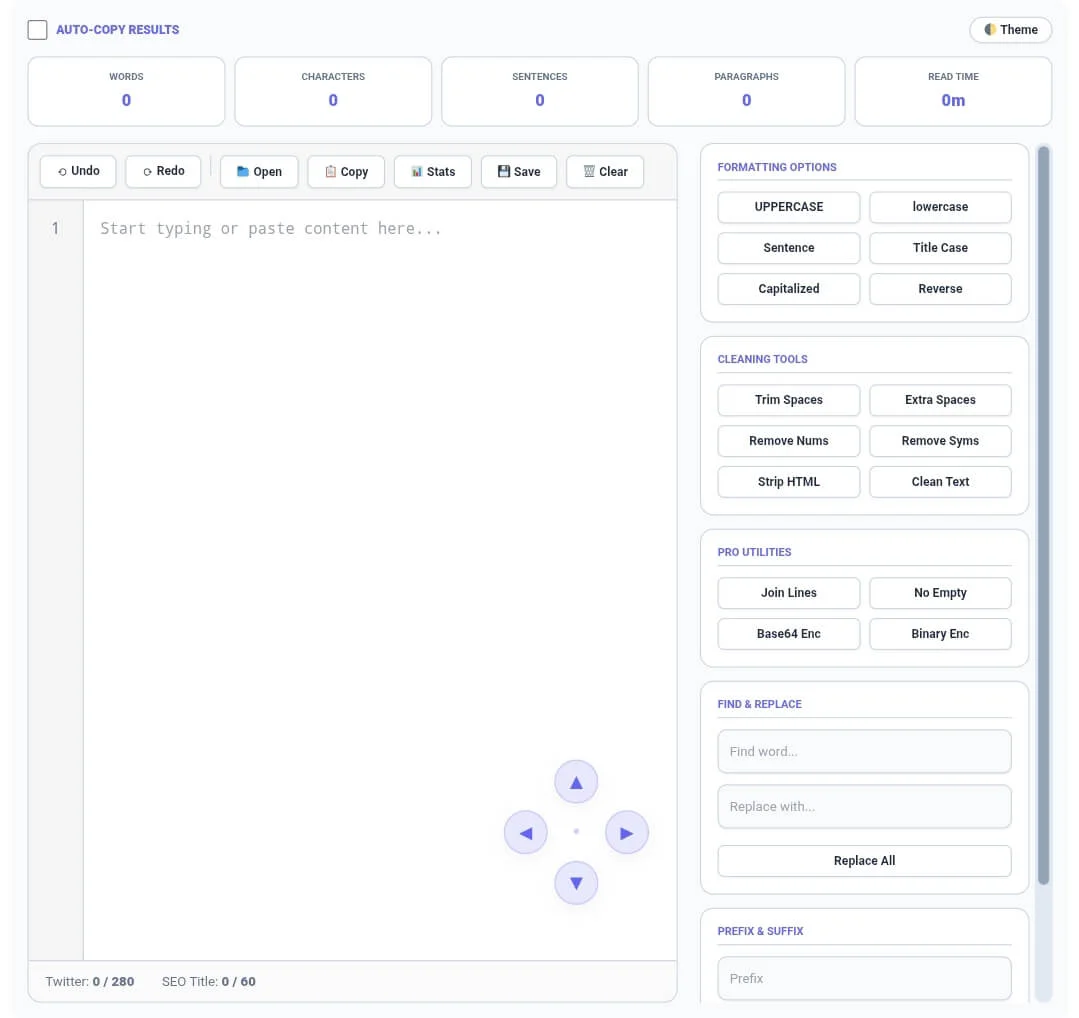
What is Word Counter?
Word Counter is an advanced text analysis tool that goes far beyond simple word counting functionality. It serves as a complete writing companion that tracks words, characters (including spaces), lines, paragraphs, and provides detailed text statistics with professional accuracy. The tool features real-time counting as you type or paste content, file upload support for multiple document formats, and over 20 different text transformation options including case conversion, text cleaning, duplicate removal, and word manipulation features.
When you use Word Counter, you get actionable insights about your writing. The tool calculates average word length to help you assess readability, identifies your most frequently used words to prevent repetition, and monitors platform-specific limits to ensure your content fits perfectly on Twitter, in meta descriptions, or within other character-constrained environments.
Built for maximum efficiency, Word Counter includes innovative features like auto-copy functionality that instantly saves transformed text to your clipboard, comprehensive undo/redo history that tracks up to 50 actions, and a dark mode option for comfortable extended use during late-night writing sessions. All processing happens locally in your browser, meaning your text never leaves your device and your privacy is completely protected.
How to Use Word Counter
Basic Usage
Using Word Counter is simple. Navigate to the tool and find a clean, spacious text editor waiting for your content. Start typing directly into the main editor area, or paste text you’ve copied from another source such as Microsoft Word, Google Docs, websites, or PDF files. As soon as text appears, the statistics dashboard above the editor updates instantly in real-time.
Five key metrics appear automatically: word count shows the total number of words in your document; character count displays every single character including spaces and punctuation; line counter reveals how many lines your text occupies; average word length calculates the mean character count per word to help assess readability; and top word frequency identifies your most commonly used word along with its occurrence count.
File Upload
Word Counter supports seamless file upload functionality. Click the Open button in the toolbar, and a file selector appears allowing you to upload various text-based file formats including .txt documents, .js JavaScript files, .html web pages, .css stylesheets, .py Python code, .md markdown files, .json data structures, .sql database queries, .xml configuration files, .log system logs, .env environment variables, and .csv spreadsheet data. The tool accepts files up to 2MB in size, ensuring smooth performance even with substantial documents.
Export Options
After analyzing or modifying your text, Word Counter offers multiple export options. Click the Save button to download your processed text as a timestamped text file. The Copy button provides instant clipboard access to your text, perfect for pasting into emails, content management systems, or social media platforms. For users who frequently move between applications, enable the auto-copy feature to automatically transfer transformed text to clipboard without additional clicking.
Text Transformation Tools
The sidebar contains powerful text transformation tools organized into logical groups. Word Actions let you sort words alphabetically, reverse word order, shuffle words randomly, or remove duplicate words entirely. Case & Formatting tools provide complete control over text appearance. Convert everything to UPPERCASE for emphasis, transform to lowercase for consistency, apply sentence case, or use title case for headlines. Cleaning Tools help refine imported content by removing extra spaces, stripping out numbers, eliminating symbols, stripping HTML tags, joining multiple lines, and removing empty lines.
Auto-Copy Feature
The AUTO-COPY RESULTS checkbox represents a significant productivity enhancement. When enabled, any text transformation you perform automatically copies the result to your clipboard. This eliminates the extra step of manually copying after each operation, streamlining workflows for users who process multiple text batches sequentially.
Dark Mode
Click the Theme button (🌓) to toggle between light and dark mode. Dark mode reduces eye strain during extended writing sessions, especially in low-light environments. The interface colors adjust completely, with all text, buttons, and statistics maintaining readability against the darker background.
Key Features
Real-Time Statistics Dashboard
Word Count: Instant word counting as you type or paste
Character Count: Total characters with space preservation
Line Counter: Automatic line numbering with scroll sync
Average Word Length: Calculates mean character count per word
Top Word Density: Identifies most frequent word with occurrence count
Paragraph Counter: Automatically detects paragraph breaks
Advanced Text Manipulation Tools
Sort Words: Alphabetically organize all words in your document
Reverse Words: Flip the entire word sequence
Shuffle Words: Randomize word order for content variation
Remove Duplicates: Eliminate repeated words instantly
Case Converter: Uppercase, lowercase, sentence case, title case
Text Reverser: Reverse entire text or individual words
Trim Spaces: Remove unnecessary whitespace
Comprehensive Text Cleaning Suite
Remove Extra Spaces: Collapse multiple spaces into single spaces
Remove Numbers: Strip out all digits from text
Remove Symbols: Eliminate punctuation and special characters
Strip HTML: Remove all HTML tags from web-copied content
Join Lines: Combine multiple lines into single paragraphs
Remove Empty Lines: Eliminate blank lines from documents
File Management Features
Multi-Format Support: Upload 10+ text-based file formats
Smart Save: Auto-timestamped downloads with format preservation
Local Storage: Automatic content save – never lose your work
File Open: Direct upload from your device
Platform-Specific Limit Tracking
Twitter Counter: Real-time 280 character monitoring
SEO Title Monitor: 60-character limit tracker for meta descriptions
Visual Indicators: Color-coded limits showing safe zones and warnings
User Experience Enhancements
Dark/Light Theme: Toggle between modes for eye comfort
Undo/Redo History: 50-step action tracking
4-Way Scroll Controls: Precision navigation for large documents
Line Numbers: Synchronized scrolling with text area
Auto-Copy Results: Instant clipboard transfer after transformations
Keyboard Shortcuts: Ctrl+Z for undo, Ctrl+Y for redo
Word Counter vs Other Tools
When evaluating text analysis tools, Word Counter stands out for its combination of powerful features, complete privacy, and zero cost. Here’s how it compares to basic word counters and premium alternatives:
| Feature | Word Counter (CalcFlow) | Basic Online Counters | Premium Paid Tools |
|---|---|---|---|
| Real-time word counting | ✅ Instant updates | ✅ Yes | ✅ Yes |
| Character counting | ✅ Complete | ⚠️ Often limited | ✅ Complete |
| Line counting | ✅ Automatic | ❌ Rarely included | ⚠️ Sometimes |
| Paragraph counting | ✅ Yes | ❌ No | ⚠️ Premium only |
| Average word length | ✅ Free forever | ❌ No | ⚠️ Usually paid |
| Top word density | ✅ Complete analysis | ❌ No | ⚠️ Paid feature |
| File upload support | ✅ 10+ formats | ❌ Text only | ✅ Yes |
| File download | ✅ Timestamped | ❌ No | ✅ Yes |
| Local storage | ✅ Automatic | ❌ No | ⚠️ Sometimes |
| Case conversion | ✅ 4+ options | ❌ No | ⚠️ Limited |
| Duplicate removal | ✅ Free | ❌ No | ⚠️ Paid |
| HTML stripping | ✅ Complete | ❌ No | ⚠️ Premium |
| Text cleaning | ✅ 6+ tools | ❌ No | ✅ Yes |
| Find and replace | ✅ Yes | ❌ No | ✅ Yes |
| Twitter counter | ✅ 280 limit | ❌ No | ⚠️ Sometimes |
| SEO title monitor | ✅ 60 character | ❌ No | ⚠️ Premium |
| Dark mode | ✅ Free | ❌ No | ⚠️ Usually paid |
| Undo/Redo history | ✅ 50 steps | ❌ No | ✅ Yes |
| Auto-copy results | ✅ Yes | ❌ No | ❌ Rarely |
| Server processing | ❌ None – 100% local | ⚠️ Often sends data | ⚠️ Varies |
| Account required | ❌ No | ❌ Usually no | ✅ Often yes |
| Price | ✅ $0 forever | ✅ Free | 💰 $5-30/month |
The comparison clearly shows that Word Counter delivers premium-level features without any cost. Basic online counters only give you simple numbers and lack the analytical depth that serious writers need. Premium tools offer similar features but require monthly subscriptions that can cost hundreds annually. Word Counter bridges this gap completely – all features, zero cost, complete privacy.
Common Use Cases
For Writers & Authors
Novelists, journalists, and freelance writers use Word Counter as an essential production tool. Track daily word count goals to maintain writing momentum – set targets of 500, 1000, or 2000 words per day and watch your progress in real-time. Monitor chapter lengths to ensure balanced manuscript structure, with ideal chapter lengths typically ranging from 2000 to 5000 words depending on genre. The top word density feature helps identify overused words that weaken prose. If “just,” “very,” or “really” appear too frequently, eliminate them systematically to strengthen your writing.
For SEO & Content Marketing
Search engine optimization requires precise content management, and Word Counter delivers the metrics that matter. Meta descriptions must stay within 155-160 characters to display fully in search results – the dedicated SEO title monitor keeps you within limits while you craft compelling snippets that drive click-through rates. Blog post optimization often requires specific word counts. Long-form content typically ranges from 1500-2500 words for competitive keywords, while shorter posts might target 600-800 words. Word Counter helps you hit these targets precisely while also analyzing keyword density to prevent over-optimization.
For Students & Academics
Academic writing demands strict adherence to word count requirements, and Word Counter eliminates guesswork. Whether your professor requires 500 words for a short response or 5000 words for a research paper, the real-time counter shows exactly where you stand. The character counter proves essential for abstracts that often have strict limits of 150-250 words. When incorporating research from multiple sources, the HTML stripper removes formatting from copied web content, while text cleaning tools eliminate extra spaces and line breaks that accumulate during copy-paste operations.
For Programmers & Developers
Code analysis becomes simple with Word Counter’s line counting and text manipulation features. Count lines of code across multiple files by pasting them sequentially, track comment-to-code ratios, or analyze log files with line-by-line navigation. The 4-way scroll controls make navigating lengthy code files effortless, while line numbers help you reference specific sections during debugging. When documenting code, the case converter ensures consistent formatting for function names and variables. The duplicate remover helps identify repeated code blocks that could be refactored into functions.
For Social Media Managers
Social media success depends on platform-optimized content, and Word Counter provides the tools to craft perfect posts. The Twitter counter shows exactly where you stand against the 280-character limit, helping you craft concise, impactful tweets that don’t require editing after posting. Content repurposing becomes effortless with text transformation tools. Convert long-form blog content into tweet-sized chunks, transform case for consistent branding across platforms, and use the duplicate remover when creating multiple variations of similar posts.
Frequently Asked Questions
Q1: Is Word Counter really free forever?
Yes, Word Counter is completely free with absolutely no hidden charges, premium tiers, or registration requirements. All features including advanced analytics, file uploads, text transformations, dark mode, and auto-copy functionality are available to everyone at no cost. There are no usage limits, no daily caps, and no features locked behind paywalls. You can use Word Counter as much as you need, for as long as you need, completely free.
Q2: What file formats can I upload?
Word Counter supports a wide range of text-based file formats including .txt documents, .js JavaScript files, .html web pages, .css stylesheets, .py Python code, .md markdown files, .json data structures, .sql database queries, .xml configuration files, .log system logs, .env environment variables, and .csv spreadsheet data. The maximum file size is 2MB to ensure smooth performance and fast processing. Files larger than 2MB should be split into smaller segments for analysis.
Q3: How accurate is the word counting?
Word Counter uses industry-standard text parsing algorithms that match the accuracy of major word processors like Microsoft Word and Google Docs within 99.9%. Words are defined as sequences of characters separated by spaces or line breaks, which is the universal standard for word counting. The character counter includes all characters including spaces, punctuation, and line breaks, matching how social media platforms calculate post lengths. For specialized counting needs like words with hyphens or apostrophes, Word Counter follows standard linguistic conventions.
Q4: Does Word Counter save my text on servers?
No, Word Counter processes everything locally in your browser. Your text never leaves your device, is never transmitted to any server, and is never stored externally. The only storage that occurs is local browser storage, which saves your text temporarily so it reappears if you accidentally close the tab. You can clear this at any time by clearing your browser data. This complete privacy protection means sensitive documents, proprietary code, or personal writing remains completely confidential.
Q5: Can I use Word Counter on mobile devices?
Yes, Word Counter is fully responsive and works perfectly on all devices including smartphones, tablets, and desktop computers. The interface automatically adjusts to smaller screens with optimized layouts – statistics stack vertically, the sidebar moves below the editor, and touch-friendly buttons ensure easy interaction. All features including file upload, text transformations, and dark mode work identically on mobile browsers, making Word Counter your portable writing companion anywhere.
Q6: How many undo steps are available?
Word Counter maintains a comprehensive 50-step history of your actions, allowing you to undo and redo changes extensively. Use the Undo button (⟲) or keyboard shortcut Ctrl+Z to reverse the most recent change, and continue pressing to step backward through your edit history. The Redo button (⟳) or Ctrl+Y moves forward through changes you’ve undone. This 50-step buffer means you can experiment freely with text transformations, knowing you can always return to previous versions even after multiple changes.
Check out our other useful text and calculator tools:
- Line Counter – Count lines in text and code
- Character Counter – Count characters with and without spaces
Paragraph Counter – Count paragraphs and sentences
Text Case Converter – Format text case
Text Reverser – Reverse text and words
Text to Morse Code – Convert text to Morse code
Duplicate Remover – Remove duplicate lines
Text to Binary – Convert text to binary
Binary to Text – Decode binary to text
Tiny Text Generator – Create fancy text styles
Age Calculator – Calculate exact age
Percentage Calculator – Calculate percentages
BMI Calculator – Track health metrics
EMI Calculator – Calculate loan payments
- Cumulative GPA Calculator – Calculate academic GPA
Learn more about why word count matters in professional writing from this Grammarly Blog article on word count